
Export and deliver
Delivery begins after the scene has been visually validated.
Portrait video
Section titled “Portrait video”Matemium’s default video shape is 9:16, suitable for:
- YouTube Shorts
- TikTok
- Instagram Reels
- Mobile-first lessons
Keep important text and labels away from platform interface overlays.
Landscape video
Section titled “Landscape video”Use 16:9 for:
- Standard YouTube lessons
- Classroom projection
- Presentations
- Embedded course videos
Changing orientation can affect layout and camera composition. Validate a landscape render independently instead of assuming the portrait composition will translate automatically.
Full-sheet export
Section titled “Full-sheet export”Export the entire reasoning tape as PNG or PDF when viewers need:
- A study sheet
- A printable derivation
- A complete reference
- An accessible static companion to the video
The full sheet uses its natural length rather than forcing the content into a video frame.
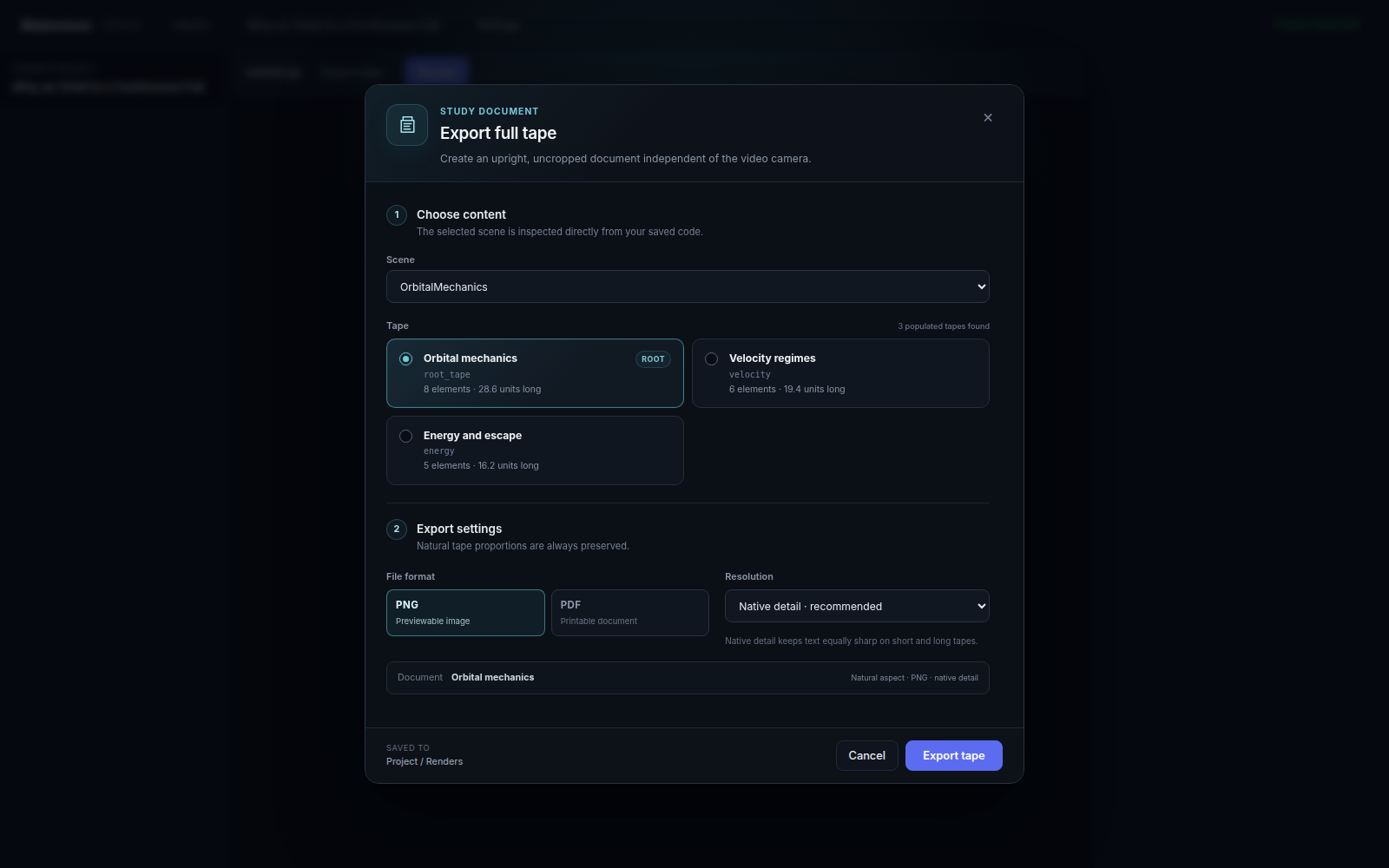
In the desktop, choose Export tape, select a saved scene and any populated tape, then choose PNG or PDF plus native, 2160 px, or 4096 px detail. The result is saved under Project → Renders and can be previewed or revealed in the file manager.
From an engine checkout:
scene = builder.to_scene()scene.export_full_sheet( "my_explanation", full_tape=True, format="png",)Complete project archive
Section titled “Complete project archive”Use the archive control on a project card when the editable workspace must move
with the output. Matemium writes a .matemium.zip containing the project source,
briefs, all tape-content files, imported media, and render history. Import
Project validates the archive and opens it as a new local project.
This is different from a tape document: a project archive is for backup, handoff, and continued editing, not for direct viewing or printing.
See the complete import/export workflow →
Reel cutting
Section titled “Reel cutting”Long-form projects can be divided into vertical segments around meaningful chapter boundaries. Review every cut:
- Do not begin a segment in the middle of an unresolved statement.
- Reintroduce context when earlier content is no longer visible.
- Keep titles and conclusions inside each deliverable segment.
Audio assembly
Section titled “Audio assembly”Voice-synthesis and custom-voice projects should attach only approved audio. Avoid unnecessary video re-encoding during final assembly when the workflow can reuse the validated video stream.
Publishing
Section titled “Publishing”Publishing is an explicit action. Local output is not automatically uploaded. Before publishing:
- Verify subject accuracy.
- Confirm rights to imported media and audio.
- Watch the final assembled file.
- Add captions or a transcript where appropriate.
- Retain the project source needed for later corrections.